Tuesday, December 02, 2008
Using MSBuild Extension Pack with BizTalk 2006
To solve this issue a group of developers got together and created the MSBuild Extension Pack Project. The Extension Pack provides MSBuild Tasks for BizTalk 2006, SQL 2005, SQL 2008, among others. Tasks for BizTalk include tasks for checking the existence of an Application, adding/removing References, starting/stopping Applications, and creating/deleting Applications. The Extension Pack includes a help file and samples for all this functionality.
BAM: The Case of the Missing Pivot Table Data
I had a recent problem getting a pivot table to display its data on the BAM portal. I went thru a series of steps to get it working, so in case you have a similar problem here are some things to check to get the data displaying.
To frame things: I had a BAM activity with a series of data points to be tracked. I needed to extract a very simple count/sum cube from the data.
I set up the activity and went thru the view setup in Excel. I had a dimension which tracks a calling system and a then I wanted to get a count/sum of another field which was setup as an integer.
I couldn’t get it working; the view in the portal wouldn’t show any data at all. The calling system wouldn’t appear and neither would the count. I tried to set up the view as both a count (like a rowcount) and a sum and neither one showed the data.
I was pretty sure that I set the activity up correctly so I began to look at different things that could be wrong.
One of the first was to check if the SQL job "TrackedMessages_Copy_BizTalkMsgBoxDb" was running, it was.
Next, I used the SQL Management Studio to connect to Analysis Services on the server that BAM was configured on. I located the cube I was interested in, right clicked on it and select "Process...", data should have appeared. It didn’t. Something else was wrong.
I checked the associated SSIS package which is called BAM_AN_
Documentation for this can be seen here: http://msdn.microsoft.com/en-us/library/aa560072.aspx
So, to get things working right, I scheduled the SSIS package to the correct time interval and things were on track.
Tuesday, November 25, 2008
BizTalk Training Scenario
To help bridge the gap I’ve put together a draft training scenario that when fully implemented will hopefully give someone skills with a good cross section of BizTalk features and functionality that they can work on while waiting to get the opportunity to work on a BizTalk project. There is no supplied code to get the developer started, and no detailed steps to follow to build it. There is some high level guidance on what sub-systems to create, and what each sub-system should do. The idea is that figuring this out on your own and building it from scratch will better prepare someone for real project work than just doing labs and reading.
I’m sure this scenario can use some room for improvement, but if you’ve already read up on BizTalk, and you’ve run through labs available in either training courses or Microsoft virtual labs, you might find this a useful way to become more proficient.
The scenario is broken into an intermediate section that focuses on giving the developer experience with the following:
- Separation of implementation features into a set of separate applications or services that are decoupled from each other
- Parsing flat files using both positional and delimited formats
- Creating orchestrations that output data through both direct binding and “specify later” ports
- Using various transport mechanisms (file, SQL, WCF Web service, SharePoint, Email)
- Using correlation sets
- Creation of canonical and vendor specific message types
- Creation of Deployment MSI's, binding files, etc. to support an install that doesn’t require Visual Studio.
- The Business Rule Engine
- Business Activity Monitoring
- The Microsoft ESB Toolkit
- Messaging / orchestration / mapping topics - failed message routing, dynamic ports, other messaging formats (EDI X12, Excel spreadsheets, etc.), use of xslt functoids.
- Tuning and testing
The following link contains a zip file with the following materials:
- Training Scenario Overview.doc – Document describing the training scenario
- Message Specifications.xls – Excel file detailing the fields in each message (also captured in the overview document)
- VendorPurchaseOrder.txt – Sample Vendor Purchase Order
- VendorShippingNotice.txt – Sample Vendor Shipping Notice
- VendorInvoice.txt – Sample Vendor Invoice
- CreateCrmDB.sql – SQL Script which creates the CRM database
- CreateCrmTable.sql – SQL Script which creates the CRM Accounts table within the CRM database
Monday, November 24, 2008
Activity Missing from your BAM Portal? This May be Why...
I thought it might have been a mistake in my configuration, deployment, or a rights issue. After a series of experiments I couldn't determine anything wrong with either my configuration or deployment so I turned to investigating if it was a rights issue or not.
It turned out to be. The following lines saved as a .bat file did the trick. Just replace the bracketed [ ] items with the names from your environment and it will work.
"C:\Program Files\Microsoft BizTalk Server 2006\Tracking\BM"
add-account -AccountName:[DOMAIN\user] -View:[ViewName]
-Server:[ServerName] -Database:BAMPrimaryImport
Thursday, November 13, 2008
BizTalk Adapter for DB2
Introduction
I recently used the BizTalk Adapter for DB2 on a project for a large Insurance company. A few interesting topics worth mentioning about this effort; connection parameters, error codes, and client side trace.
My experience involved calling DB2 stored procedures but they did not themselves use transactions. The stored procedures had been developed by the client using a COBOL CASE tool. So, this was basically a mechanism to call external COBOL routines that handled the business actual functions.
BizTalk Adapter for DB2
From MSDN (links at end):
The BizTalk Adapter for DB2 is a send and receive adapter that enables BizTalk orchestrations to interact with host systems. Specifically, the adapter enables send and receive operations over TCP/IP and APPC connections to DB2 databases running on mainframe, AS/400, and UDB platforms. Based on Host Integration Server technology, the adapter uses the Data Access Library to configure DB2 connections, and the Managed Provider for DB2 to issue SQL commands and stored procedures.
Connection Parameters
Some of the nomenclature when running the DB2 connection wizard can be a little confusing. Here is how it worked for this last project. The first two steps of the wizard are shown below. The third step is for the Username/Password and is not displayed.
Step One
- Address or alias: The AS400 server name.
- Port: Left as default 446.
Step Two
- Initial Catalog: Same as Address, as shown above
- Package collection: Client's default collection
- Default schema: Same as package collection
- Default qualifier: [blank]
Error Codes
The major key to understanding error codes returned from the DB2 adapter is that some errors are DB2 server generated, while some errors are provider specific; in this case Microsoft's DB2 managed provider. The SQL SATE codes are available in the exception for the stored procedure call. Depending on your implementation, an event log my also be found.
For example SQL STATE code "22001" represents a data truncation error. This can happen if the data passed to a stored procedure parameter is too wide. See the link at the end of the article for other codes.
A SQL STATE value of "HY000" represents the provider specific error. One example would be a connectivity problem.
Please see the links at the end of the article for further reading.
Tracing BizTalk DB2 Calls
A utility called SNATrace is installed with the host adapters on the BizTalk server. It provides ad-hoc logging of the connectivity with the AS/400.
A brief blog from an actual team member of the DB2 Adapter product about using “snatrace” is provided below for further reading.
External Links from MSDN
- BizTalk Adapter for DB2
- Troubleshooting the OLE DB Provider for DB2
- DB2 Connection String Parameters
- Tracing a DB2 call
- Understanding a failure trace
- Package collections described
Other External Links
Wednesday, November 12, 2008
BTS Mapping With External Assemblies Part 3
Introduction
Part 1 - Inline scripting and external assemblies
Part 2 - XSLT Call Templates and custom extensions
Part 3 - Cascading Functoids
This is the third of three articles about BizTalk mapping with external assemblies. External assemblies or helper classes are used by BizTalk's mapping engine (XSLT) automatically, and they can also be used explicitly by the developer. Just as in an orchestration, a developer may find a requirement that the built in mapping tools ("functoids") do not address and in this case judicious use of a helper class can be very... helpful.
While these articles are not an introduction to mapping if you have a little experience with the BizTalk mapper and a little experience with XSLT you should be able to follow along.
Part 1, introduces inline C# scripting, its limitations, and also introduces the scenario of using an external assembly (helper class) automatically. Part 2, demonstrates using a map's custom extension property, which allows us to explicitly access external assemblies. Part 3, this article, will build on this discussion and highlight potential caveats about using cascading functoids; when the output of one functoid is the input to another functoid(s).
Validating Maps that use Cascading Functoids
Whether a transformation is simple or complex, I often find validating a BizTalk map and viewing the XSLT output is beneficial. Below is an example of a simple map containing a cascading functoid; a function that calls another function. If we review the resulting XSL file the output is as expected. Yet, the output from maps containing cascading functoids that output to multiple targets (be it other functoids or other nodes) does not generate as I would expect.
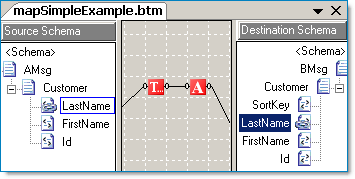
The XSLT output from this map is as expected. The variable v1 contains the right trimmed string and serves as input to the UpperCase functoid, the output of which is assigned to v2. The value of v2 is then contained in the LastName node.
<xsl:template match="/s0:AMsg">
<xsl:variable name="var:v1"
select="userCSharp:StringTrimRight(string(Customer/LastName/text()))" />
<xsl:variable name="var:v2"
select="userCSharp:StringUpperCase(string($var:v1))" />
<ns0:BMsg>
<Customer>
<LastName>
<xsl:value-of select="$var:v2" />
</LastName>
</Customer>
</ns0:BMsg>
</xsl:template>
Note: The built in functoids imbed inline C# code. We can use the "userCSharp:" XSL namespace ourselves when constructing XSLT functoids. We will see an example below.
Functoids with Multiple Outputs
The XSLT story changes when we examine output from the BizTalk mapper when using a functoid that is connect to more than one node (or cascading functoid). It turns out that in the example below, you will see that the entire functoid chain is executed twice. Once for the SortKey node, and once for the LastName node.
Typically a functoid with multiple outputs will be executed once for each output. In this example, the entire functoid chain is executed once for each connection. Imagine using a helper class to get a database value, if one is not careful the same database helper method might be executed more than one time! The XSLT code below is what the BizTalk mapper generated for the map above.
<xsl:template match="/s0:AMsg">
select="userCSharp:StringTrimRight($var:v3)" />
<!-- SortKey functoid chain -->
<xsl:variable name="var:v1"
select="userCSharp:StringTrimRight(string(Customer/LastName/text()))" />
<xsl:variable name="var:v2"
select="userCSharp:StringUpperCase(string($var:v1))" />
<!-- LastName functoid chain -->
<xsl:variable name="var:v3"
select="string(Customer/LastName/text())" />
<xsl:variable name="var:v4"
<xsl:variable name="var:v5"
select="userCSharp:StringUpperCase(string($var:v4))" />
<ns0:BMsg>
<Customer>
<SortKey>
<xsl:value-of select="$var:v2" />
</SortKey>
<LastName>
<xsl:value-of select="$var:v5" />
</LastName>
</Customer>
</ns0:BMsg>
</xsl:template>
BizTalk Transformations with Value Caching
Let's expand on the example above. In the map below we have two functoid chains, each go to their respective output element and also to a string concatenation function, which is in turn connected to the SortKey field. Because we want our imagined map to be as efficient as possible we won't be able to completely use BizTalk's drag and drop mapping. We will need to eliminate the multiple connections that go to both the concatenation functoid and to the target fields. One way to do this is by implementing value caching combined with an XSLT call template to eliminate the multiple executions of the same methods. After describing the approach, there will be a short review of the benefits and caveats.
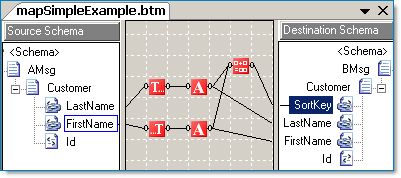
Value Caching with XSLT Call Templates and Inline C#
By looking at the first cut of our hypothetical map above, we can see that the LastName, FirstName, and SortKey target fields are all interconnected. Thus we are going to eliminate all the functoid chains and replace them with a single XSLT call template. In addition we'll add our own standalone C# code.
By adding an inline C# scripting functoid (#1) we can add methods to be called by the XSLT (#2) in the map.
Even though functoid #1 is "floating" the C# code is still included in the map. This is a simple example of some accessor and related functions. They mainly will serve to cache the First and Last Name values so that we don't have to process them twice (Trim + Uppercase). The actual process of processing the string is for example only, the process could equally have been a database call to a helper function via an External Assembly object.
// SortKey: Return LastName + comma + FirstName
//
public string GetSortKey()
{
return System.String.Format("{0},{1}", GetLastName(), GetFirstName());
}
// LastName: Trim + Uppercase
//
public string _lastName = null;
public void SetLastName(string LastName)
{
_lastName = LastName.Trim();
_lastName = LastName.ToUpper();
}
// LastName: Return value
//
public string GetLastName()
{
return _lastName;
}
// FirstName: Trim + Uppercase
//
public string _firstName = null;
public void SetFirstName(string FirstName)
{
_firstName = FirstName.Trim();
_firstName = FirstName.ToUpper();
}
// FirstName: Return value
//
public string GetFirstName()
{
return _firstName;
}
Functoid #2 is an XSLT template, and it will call the C# methods and emit the SortKey, LastName, and FirstName fields. Here is what the XSLT call template looks like, it is quite similar to what we've already seen in the prior articles.
<xsl:template name="CustomerAndSortKeyTemplate">
<!--Customer & SortKey Input -->
<xsl:param name="LastName" />
<xsl:param name="FirstName" />
<!-- Cache and process the last/first name values:
Call C# using the "userCSharp" namespace alias
that the BizTalk mapper itself generated.
Note: These calls return "void" thus, no output! -->
<xsl:value-of select="userCSharp:SetLastName($LastName)"/>
<xsl:value-of select="userCSharp:SetFirstName($FirstName)"/>
<!-- Emit the SortKey, LastName and FirstName fields -->
<!-- SortKey -->
<xsl:element name="SortKey">
<xsl:value-of select="userCSharp:GetSortKey()"/>
</xsl:element>
<!-- LastName (another way to emit a field) -->
<LastName>
<xsl:value-of select="userCSharp:GetLastName()"/>
</LastName>
<!-- FirstName -->
<FirstName>
<xsl:value-of select="userCSharp:GetFirstName()"/>
</FirstName>
</xsl:template>
Summary
Using XSLT and C# caching can be an efficient approach to designing a map that would otherwise unnecessarily consume too much processing bandwidth if the map were solely generated by the default BizTalk Mapper design output.
Some considerations to think about:
- Using XSLT with the BizTalk mapper might require that you or your client have a comfort level about designing the mapping outside of the normal Drag and Drop approach. However, the efficiency of the custom XSLT, and to some degree the straight-forwardness of it may outweigh the amount of design time needed for a complicated Drag and Drop map.
- The XSLT approach is more sensitive to schema changes. A simple map with out XSLT will fail validation (if not outright fail to compile) if a schema changes. However, custom XSLT is ultimately just syntax based on a matching mechanism. There is not compile time validation that the elements being emitted conform to the current target schema.
External Links from MSDN
- Custom Extension XML (Grid Property)
- Scripting Using External Assemblies
- Scripting Using Inline C#, JScript .NET, and Visual Basic .NET
- Scripting Using Inline XSLT and XSLT Call Templates
- Extending Mapper (BizTalk Server Sample)
External Links about BizTalk Mapper Performance
Article Links
Thursday, October 23, 2008
Managing SAP Connections with LOB SAP Adapter in BizTalk 2006 R2
Recently I was working with a client to connect a BizTalk 2006 R2 process to SAP with the LOB SAP adapter. We first called a BAPI function that returned a list of contract IDs that had been modified since our last successful processing event (usually 24 hours). This list could contain anywhere from 1000 to 10000 contract IDs depending on volume and amount of time since the last processing event. Once we had the collection of contract IDs we iterate over the collection calling a separate BAPI function to retrieve the contract data for each contract ID. We quickly ran into the issue where BizTalk was overwhelming the SAP server with BAPI calls. In order to fix the issue we throttled down the number of connections made by the BizTalk Server.
To do this, we use the WCF-Custom Adapter with SAP bindings. In our Solicit-Response Send Port we select WCF-Custom as our Type and click "Configure". Click on the "Binding" tab and select sapBinding from the Binding Type drop-down. The configuration window will now display. This will look familiar to users of the mySAP adapter. The maxConnectionPerSystem setting is the one we are concerned with. In the specific instance above, we found a "sweet spot" of 25 connections. You will have to work with your SAP administrators to determine what this number will be. Make sure to consider other systems that connect to SAP (it is the SAP connection pool that we are trying to avoid overwhelming). Some trial and error are involved. Make sure to perform some high volume load testing to ensure that SAP is not being overwhelmed.
Tuesday, October 21, 2008
Microsoft’s Intentions for “Dublin”
“Dublin”, in a nutshell will:
- Provide standard host for WF and WCF applications
- Provide pre-built developer services
- Support message-based correlation and content-based message routing
- Contain a message forwarding service
- Offer a compensation service for long-running transactions
- Enable scale-out of stateful workflow applications
- Persisting and rehydrating state for high scalability
- Enhanced management and monitoring functions
- Tracking store for workflow events
- Supports “Oslo” modeling platform
You may read those bullet points and say “hey, this sounds like BizTalk”. Well, yes and no. The easiest way to view this is that some BizTalk functionality will be available within the .NET Framework.
“Dublin” will be available for download when released and will eventually be included in future releases of Windows Server. “Dublin” will be fully supported thru current support contracts.
“Dublin” will be the first Microsoft server product to deliver support for the “Oslo” modeling platform. “Dublin” does not require “Oslo” in order to operate but administrators will be able to deploy applications from the “Oslo” repository directly to the “Dublin” application server. “Dublin” provides model-driven “Oslo” applications with a powerful runtime environment, out of the box.
The intention is for “Dublin” based applications to interoperate with BizTalk based services. The integration server and application server workloads are distinct but complementary so they can be deployed separately as needed. The intention is for “Dublin” to be an application platform, BizTalk an integration platform. When they need to work together, they will be able to. Otherwise, requirements will drive which platform to use.
Thursday, October 02, 2008
New Features in BizTalk 2009
Among the highlights of the new release are:
- Support for Windows Server 2008, Visual Studio 2008, SQL Server 2008 and also the .NET Framework 3.5
- Support for Windows Server 2008 Hyper-V which is a much higher performance platform for creating virtual machines
- BizTalk 2009 takes advantage of Windows Server 2008 clustering so you can now deploy BizTalk Server so cluster nodes could reside on separate IP subnets and avoid complicated VLANs
- BizTalk Server 2009 includes a UDDI 3.0 registry which provides support for registry affiliation, extended discovery services, digital certificates and extensibility for a subscription API
- New Line of Business Adapters are introduced for Oracle E-Business Suites and SQL Server
- Additional performance improvements have been made to the existing set of adapters
- Enhanced Business Activity Monitoring- By expanding the out of the box BAM functionality with SQL Server 2008 Analysis Services, BizTalk Server 2009 provides support for UDM cubes and scalable real-time aggregations which enhances support for Microsoft PerformancePoint Server 2007
- ESB Guidance 2.0 delivers updated prescriptive guidance for applying ESB usage patterns
- Enhanced Support for EDI and AS2 Protocols
- BizTalk Server 2009 updates all message schemas and business rules for compliance with SWIFTReady Financial EAI Gold certification
- New Mobile RFID Platform and device management
- New RFID industry standards support for LLRP, TDT, TDS, WS Discovery and partial EPCIS support
- BizTalk Server 2009 improves recoverable interchange processing of validation failures by providing support for recoverable interchange processing
- The WCF Adapter has been enhanced to provide support for configurable transactions and the ability to choose the transaction isolation level in the WCF-Custom Send Adapter.
Wednesday, October 01, 2008
Introductory BizTalk Seminar
If your company faces challenges in getting new trading partners integrated into your existing systems – let RDA help you streamline your systems, processes and people.
The target audience for this event is IT management of firms facing this challenge. For information or to register, please check out our website at http://www.rdacorp.com/getting_started/events.html#Enterprise_Application_Integration_/_BizTalk_Seminar_Series