Showing posts with label Evan Aussenberg. Show all posts

Mapping Unrelated Records

Introduction

I was recently asked to create a map to combine parent records with children records. The challenge was that the children records in the source document where not grouped with their parent record.

Mapping Unrelated Records

The message was similar to the following Xml where StatusItem is related by its ordinal position to DetailStatus/DetailItem. Look carefully at the message; the StatusItem parent node is SummaryStatus, which is at the same level in the Xml as DetailStatus. There is only one SummaryStatus node, and there are multiple DetailStatus nodes – all at the same level in the Xml.

<root>
  <
SummaryStatus>
    <
SummaryCode>102</SummaryCode>

    <
StatusItem>
      <
statusCode>item_0</statusCode>
    </
StatusItem>

    <
StatusItem>
      <
statusCode>item_1</statusCode>
    </
StatusItem>

    <
StatusItem>
      <
statusCode>item_2</statusCode>
    </
StatusItem>
  </
SummaryStatus>

  <
DetailStatus>
    <
DetailItem>
      <
statusCode>detail_0</statusCode>
    </
DetailItem>
  </
DetailStatus>

  <
DetailStatus/>
    <
DetailItem>
      <
statusCode>detail_1</statusCode>
    </
DetailItem>
  </
DetailStatus>

  <
DetailStatus/>
<
root>

In reality a message similar to the above is being provided by an outside source and we cannot modify it. By convention we are given the assumption that there is a DetailStatus record for each StatusItem, however there is not always a DetailItem. Our job is to map the output and combine the StatusItem code with its each DetailItem code.

The output goal is similar to the following Xml:

<root>
  <
SummaryCode>102</SummaryCode>

  <
StatusItem>
    <
StatusCode>item_0</StatusCode>
    <
DetailItem>
      <
StatusCode>detail_0</StatusCode>
    </
DetailItem>
  </
StatusItem>

  <
StatusItem>
    <
StatusCode>item_1</StatusCode>
    <
DetailItem>
      <
StatusCode>detail_1</StatusCode>
    </
DetailItem>
  </
StatusItem>

  <
StatusItem>
    <
StatusCode>item_2</StatusCode> 
  </StatusItem>
</
root>

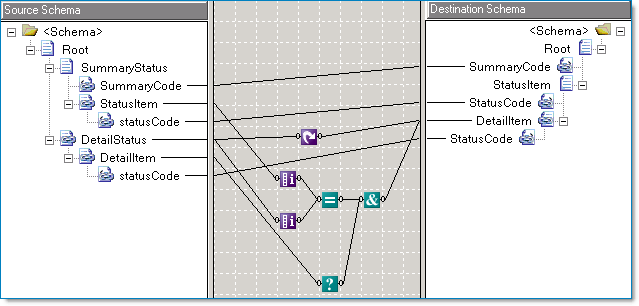
The BizTalk map below works by using the Iteration Functoid comparing the position of the current SummaryStatus parent record to the position of the DetailStatus record. Additionally the Logical Existence Functoid is used so that if a DetailItem does not appear in the source message, then it won’t appear in the Target message.

MapParentToChild

External Links from MSDN

Previous Articles

BizTalk Adapter for DB2

Introduction

I recently used the BizTalk Adapter for DB2 on a project for a large Insurance company. A few interesting topics worth mentioning about this effort; connection parameters, error codes, and client side trace.

My experience involved calling DB2 stored procedures but they did not themselves use transactions. The stored procedures had been developed by the client using a COBOL CASE tool. So, this was basically a mechanism to call external COBOL routines that handled the business actual functions.

BizTalk Adapter for DB2

From MSDN (links at end):

The BizTalk Adapter for DB2 is a send and receive adapter that enables BizTalk orchestrations to interact with host systems. Specifically, the adapter enables send and receive operations over TCP/IP and APPC connections to DB2 databases running on mainframe, AS/400, and UDB platforms. Based on Host Integration Server technology, the adapter uses the Data Access Library to configure DB2 connections, and the Managed Provider for DB2 to issue SQL commands and stored procedures.

Connection Parameters

Some of the nomenclature when running the DB2 connection wizard can be a little confusing. Here is how it worked for this last project. The first two steps of the wizard are shown below. The third step is for the Username/Password and is not displayed.

Step One

  • Address or alias: The AS400 server name.
  • Port: Left as default 446.

image

Step Two

  • Initial Catalog: Same as Address, as shown above
  • Package collection: Client's default collection
  • Default schema: Same as package collection
  • Default qualifier: [blank]

image 

Error Codes


The major key to understanding error codes returned from the DB2 adapter is that some errors are DB2 server generated, while some errors are provider specific; in this case Microsoft's DB2 managed provider. The SQL SATE codes are available in the exception for the stored procedure call. Depending on your implementation, an event log my also be found.

For example SQL STATE code "22001" represents a data truncation error. This can happen if the data passed to a stored procedure parameter is too wide. See the link at the end of the article for other codes.

A SQL STATE value of "HY000" represents the provider specific error. One example would be a connectivity problem.

Please see the links at the end of the article for further reading.

Tracing BizTalk DB2 Calls

A utility called SNATrace is installed with the host adapters on the BizTalk server. It provides ad-hoc logging of the connectivity with the AS/400. 

A brief blog from an actual team member of the DB2 Adapter product about using “snatrace” is provided below for further reading.

External Links from MSDN

Other External Links

BTS Mapping With External Assemblies Part 3

Introduction

Part 1 - Inline scripting and external assemblies
Part 2 - XSLT Call Templates and custom extensions
Part 3 - Cascading Functoids

This is the third of three articles about BizTalk mapping with external assemblies. External assemblies or helper classes are used by BizTalk's mapping engine (XSLT) automatically, and they can also be used explicitly by the developer. Just as in an orchestration, a developer may find a requirement that the built in mapping tools ("functoids") do not address and in this case judicious use of a helper class can be very... helpful.

While these articles are not an introduction to mapping if you have a little experience with the BizTalk mapper and a little experience with XSLT you should be able to follow along.

Part 1, introduces inline C# scripting, its limitations, and also introduces the scenario of using an external assembly (helper class) automatically. Part 2, demonstrates using a map's custom extension property, which allows us to explicitly access external assemblies. Part 3, this article, will build on this discussion and highlight potential caveats about using cascading functoids; when the output of one functoid  is the input to another functoid(s).

Validating Maps that use Cascading Functoids

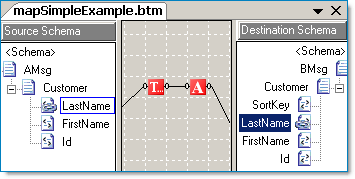
Whether a transformation is simple or complex, I often find validating a BizTalk map and viewing the XSLT output is beneficial. Below is an example of a simple map containing a cascading functoid; a function that calls another function. If we review the resulting XSL file the output is as expected. Yet, the output from maps containing cascading functoids that output to multiple targets (be it other functoids or other nodes) does not generate as I would expect.

image

The XSLT output from this map is as expected. The variable v1 contains the right trimmed string and serves as input to the UpperCase functoid, the output of which is assigned to v2. The value of v2 is then contained in the LastName node.

<xsl:template match="/s0:AMsg">
    <
xsl:variable name="var:v1"
         select="userCSharp:StringTrimRight(string(Customer/LastName/text()))"
/>
    <
xsl:variable name="var:v2"

        
select="userCSharp:StringUpperCase(string($var:v1))"
/>
    <
ns0:BMsg
>
        <
Customer
>
            <
LastName
>
                <
xsl:value-of select="$var:v2"
/>
            </
LastName
>
        </
Customer
>
    </
ns0:BMsg
>
</
xsl:template
>

Note: The built in functoids imbed inline C# code. We can use the "userCSharp:" XSL namespace ourselves when constructing XSLT functoids. We will see an example below.

Functoids with Multiple Outputs

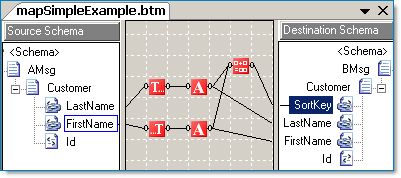
The XSLT story changes when we examine output from the BizTalk mapper when using a functoid that is connect to more than one node (or cascading functoid). It turns out that in the example below, you will see that the entire functoid chain is executed twice. Once for the SortKey node, and once for the LastName node.

image 

Typically a functoid with multiple outputs will be executed once for each output. In this example, the entire functoid chain is executed once for each connection. Imagine using a helper class to get a database value, if one is not careful the same database helper method might be executed more than one time! The XSLT code below is what the BizTalk mapper generated for the map above.

<xsl:template match="/s0:AMsg">
    <!--
SortKey functoid chain
-->
    <
xsl:variable name="var:v1"
         select="userCSharp:StringTrimRight(string(Customer/LastName/text()))"
/>
    <
xsl:variable name="var:v2"

        
select="userCSharp:StringUpperCase(string($var:v1))"
/> 

   
<!--
LastName functoid chain -->
    <
xsl:variable name="var:v3"

        
select="string(Customer/LastName/text())"
/>
    <
xsl:variable name="var:v4"

         select="userCSharp:StringTrimRight($var:v3)" />
    <
xsl:variable name="var:v5"

        
select="userCSharp:StringUpperCase(string($var:v4))"
/>
    <
ns0:BMsg
>
        <
Customer
>
            <
SortKey
>
                <
xsl:value-of select="$var:v2"
/>
            </
SortKey
>
            <
LastName
>
                <
xsl:value-of select="$var:v5"
/>
            </
LastName
>
        </
Customer
>
    </
ns0:BMsg
>
</
xsl:template>

BizTalk Transformations with Value Caching

Let's expand on the example above. In the map below we have two functoid chains, each go to their respective output element and also to a string concatenation function, which is in turn connected to the SortKey field. Because we want our imagined map to be as efficient as possible we won't be able to completely use BizTalk's drag and drop mapping. We will need to eliminate the multiple connections that go to both the concatenation functoid and to the target fields. One way to do this is by implementing value caching combined with an XSLT call template to eliminate the multiple executions of the same methods. After describing the approach, there will be a short review of the benefits and caveats.

image

Value Caching with XSLT Call Templates and Inline C#

By looking at the first cut of our hypothetical map above, we can see that the LastName, FirstName, and SortKey target fields are all interconnected. Thus we are going to eliminate all the functoid chains and replace them with a single XSLT call template. In addition we'll add our own standalone C# code.

By adding an inline C# scripting functoid (#1) we can add methods to be called by the XSLT (#2) in the map.

image 

Even though functoid #1 is "floating" the C# code is still included in the map. This is a simple example of some accessor and related functions. They mainly will serve to cache the First and Last Name values so that we don't have to process them twice (Trim + Uppercase). The actual process of processing the string is for example only, the process could equally have been a database call to a helper function via an External Assembly object.

// SortKey: Return LastName + comma + FirstName
//
public
string GetSortKey()
{
    return System.String.Format("{0},{1}", GetLastName(), GetFirstName());
}

// LastName: Trim + Uppercase
//
public string _lastName = null;
public void SetLastName(string LastName)
{
    _lastName = LastName.Trim();
    _lastName = LastName.ToUpper();
}

// LastName: Return value
//
public string GetLastName()
{
    return _lastName;
}

// FirstName: Trim + Uppercase
//
public string _firstName = null;
public void SetFirstName(string FirstName)
{
    _firstName = FirstName.Trim();
    _firstName = FirstName.ToUpper();
}

// FirstName: Return value
//
public string GetFirstName()
{
    return _firstName;
}


Functoid #2 is an XSLT template, and it will call the C# methods and emit the SortKey, LastName, and FirstName fields. Here is what the XSLT call template looks like, it is quite similar to what we've already seen in the prior articles.

<xsl:template name="CustomerAndSortKeyTemplate">
    <!--
Customer & SortKey Input
-->
    <
xsl:param name="LastName"
/>
    <
xsl:param name="FirstName"
/>

    <!--
Cache and process the last/first name values:
         Call C# using the "userCSharp" namespace alias
         that the BizTalk mapper itself generated.
         Note: These calls return "void" thus, no output!
-->
    <
xsl:value-of select="userCSharp:SetLastName($LastName)"
/>
    <
xsl:value-of select="userCSharp:SetFirstName($FirstName)"
/>
   
    <!--
Emit the SortKey, LastName and FirstName fields
-->
    <!--
SortKey
-->
    <
xsl:element name="SortKey"
>
        <
xsl:value-of select="userCSharp:GetSortKey()"
/>
    </
xsl:element
>

    <!--
LastName (another way to emit a field)
-->
    <
LastName
>
        <
xsl:value-of select="userCSharp:GetLastName()"
/>
    </
LastName
>

    <!--
FirstName
-->
    <
FirstName
>
        <
xsl:value-of select="userCSharp:GetFirstName()"
/>
    </
FirstName
>
</
xsl:template>

Summary

Using XSLT and C# caching can be an efficient approach to designing a map that would otherwise unnecessarily consume too much processing bandwidth if the map were solely generated by the default BizTalk Mapper design output.

Some considerations to think about:

  • Using XSLT with the BizTalk mapper might require that you or your client have a comfort level about designing the mapping outside of the normal Drag and Drop approach. However, the efficiency of the custom XSLT, and to some degree the straight-forwardness of it may outweigh the amount of design time needed for a complicated Drag and Drop map.
  • The XSLT approach is more sensitive to schema changes. A simple map with out XSLT will fail validation (if not outright fail to compile) if a schema changes. However, custom XSLT is ultimately just syntax based on a matching mechanism. There is not compile time validation that the elements being emitted conform to the current target schema.

External Links from MSDN


External Links about BizTalk Mapper Performance

Article Links

Mapping With External Assemblies Part 2

Introduction

Part 1 - Inline scripting and external assemblies
Part 2 - XSLT Call Templates and custom extensions
Part 3 - Cascading Functoids

This is the second of three articles about BizTalk mapping with external assemblies. External assemblies or helper classes are used by BizTalk's mapping engine (XSLT) automatically, and they can also be used explicitly by the developer. Just as in an orchestration, a developer may find a requirement that the built in mapping tools ("functoids") do not address and in this case judicious use of a helper class can be very... helpful.

While these articles are not an introduction to mapping if you have a little experience with the BizTalk mapper and a little experience with XSLT you should be able to follow along.

Part 1, introduces inline C# scripting, its limitations, and also introduces the scenario of using an external assembly (helper class) automatically. Part 2, this article, demonstrates using a map's custom extension property, which allows us to explicitly access external assemblies. Part 3 will build on this discussion and highlight potential caveats about using cascading functoids; when the output of one functoid  is the input to another functoid(s).

External Assembly Script Type Review

In part 1 we examined inline scripting with C# and pointed out that only the built-in XSLT engine namespaces can be used. We also showed that when using an External Assembly Script Type an Extension Object XML file is automatically created, which contains the external assembly references that the XSL will use.

The contents of the Extension Object Xml file that is made during the build looks like this:

<ExtensionObjects>
  <
ExtensionObject
      Namespace=
"http://schemas.microsoft.com/BizTalk/2003/ScriptNS0"
      AssemblyName="
RDA.BizTalk.Learning.MapUtility,
          Version=1.0.0.0,
          Culture=neutral,
          PublicKeyToken=f7eb52812c0b3fa1
"
      ClassName="RDA.BizTalk.Learning.MapUtility.Strings"
/>
</
ExtensionObjects>


Custom Extension Xml Property

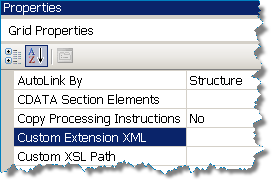
imageIf we want to explicitly include external assemblies in our map we can assign the "Custom Extension Xml" Grid Property. Click on the background (grid) of your map in design mode to find the properties. The property represents an Xml file that is formatted as shown above, and it will contain only those assemblies that you wish to manually reference. As we will see, other assemblies referenced by External Assembly Script Types will be automatically appended to this file during the build.

I normally name my file "External Assemblies.xml". The following is an example. I usually leave the Namespace as the Namespace of the class.  That way if I have one assembly (as I do below) I will have 2 unique namespaces. Remember, your external assemblies are probably already in the GAC.

<ExtensionObjects>
    <
ExtensionObject
        Namespace=
"http://RDA.Corporate.EAI.Common.Helper.Methods.Timestamps"
        AssemblyName="
RDA.Corporate.EAI.Common.Helper.Methods,
                     
Version=1.0.0.0,
                      Culture=neutral,
                      PublicKeyToken=9f177c4f1a417459
"
        ClassName="RDA.Corporate.EAI.Common.Helper.Methods.Timestamps"
/>
    <
ExtensionObject
        Namespace="http://RDA.Corporate.EAI.Common.Helper.Methods.DBUtility"
        AssemblyName="
RDA.Corporate.EAI.Common.Helper.Methods,
                      Version=1.0.0.0,
                      Culture=neutral,
                      PublicKeyToken=9f177c4f1a417459
"
        ClassName="RDA.Corporate.EAI.Common.Helper.Methods.DBUtility"/>

</ExtensionObjects>

Using the Referenced External Assemblies

We already know that unfortunately we cannot use these classes with inline C# scripting. However, we also know that ultimately the mapper is simply creating XSLT and calling the C# methods, and we can do the same.

Let's pretend, for example, that based on a meeting number, room number and timestamp that I need to retrieve a meeting record id. My DBUtility class contains the methods I need to use.

  1. Add a reference for the RDA.Corporate.EAI.Common.Helper.Methods assembly.
  2. Create and add External Assemblies.xml file (named to your liking) to your map project.
  3. Assign the Custom Extension XML Grid Property.
  4. Add a scriptoid to your map.
  5. Set it's script type to XSLT Call Template.
  6. Assign input parameters, and assign the output to the target schema node as required.

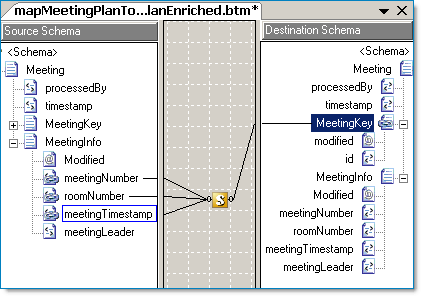
Here is my map, I'm going to enrich the original message by filling in the MeetingKey record. I'll be using an XSLT call template. Remember it is the XSLT that is driving the mapping within the scriptoid. See the next paragraph.


image 


Here is my XSLT call template that I've assigned to my scriptoid shown above.

<xsl:template name="MeetingKeyCallTemplate">

    <!--
Meeting Key Input
-->
    <
xsl:param name="meetingNumber"
/>
    <
xsl:param name="roomNumber"
/>
    <
xsl:param name="meetingTimestamp"
/>

    <!--
Get the meeting key and assign it to variable
-->
    <
xsl:variable name="meetingKey"  
       
<!-- I'll just use the prefix "script" which is easy to type --> 
        xmlns:script="http://RDA.Corporate.EAI.Common.Helper.Methods.DBUtility"
        <!-- Call my external method GetMeetingKey() -->                  
        select="script:GetMeetingKey($meetingNumber,
                       $meetingTimestampDateTime,
                       $roomNumber)
"
/> 

    <!--
Emit the MeetingKey and modified attribute values
--> 
    <MeetingKey>
        <
xsl:attribute name="modified">Yes</xsl:attribute
>

        <
xsl:element name="id"
>
            <
xsl:value-of select="$meetingKey"
/>
        </
xsl:element
>
    </
MeetingKey
> 

   
<!--
Emit the MeetingNumber, RoomNumber and MeetingLeader fields --> 
    <MeetingInfo>
        <
xsl:element name="MeetingNumber"
>
            <
xsl:value-of select="$meetingNumber"
/>
        </
xsl:element
>

        <
xsl:element name="RoomNumber"
>
            <
xsl:value-of select="$roomNumber"
/>
        </
xsl:element
>

       <!-- Note: The MeetingLeader value comes directly from the original message  -->
      
<xsl:element name="MeetingLeader">
            <
xsl:value-of select="MeetingInfo/MeetingLeader/text()"
/>
        </
xsl:element
>
    </
MeetingInfo
>

</
xsl:template>

TIP: In part 3 we'll see similar code again and we will combine into one example the use of external assemblies, inline C# scripting and value caching in a discussion about cascading functoids.

Custom Extension XML and External Assembly Script Types

The BizTalk mapper will accommodate maps using both custom Extension XML file as described here and also uses External Assembly Script Types. In this case the Extension Object XML file that is used will combine your custom references along with the automatically added External Assembly Script Type references. Validate your map and check it out!


External Links from MSDN


External Links about BizTalk Mapper Performance

Mapping With External Assemblies Part 1

Introduction

Part 1 - Inline scripting and external assemblies
Part 2 - XSLT Call Templates and custom extensions
Part 3 - Cascading Functoids

This is the first of three articles about BizTalk mapping with external assemblies. External assemblies or helper classes are used by BizTalk's mapping engine (XSLT) automatically, and they can also be used explicitly by the developer. Just as in an orchestration, a developer may find a requirement that the built in mapping tools ("functoids") do not address and in this case judicious use of a helper class can be very... helpful.

While these articles are not an introduction to mapping if you have a little experience with the BizTalk mapper and a little experience with XSLT you should be able to follow along.

Part 1, this article, introduces inline C# scripting, its limitations, and also introduces the scenario of using an external assembly (helper class) automatically. Part 2 demonstrates using a map's custom extension property, which allows us to explicitly access external assemblies. Part 3 will build on this discussion and highlight potential caveats about using cascading functoids; when the output of one functoid  is the input to another functoid(s).

Inline Scripting with C#

As you probably know, using C# within a map is very easy to do. Drag the scripting functoid to the map:
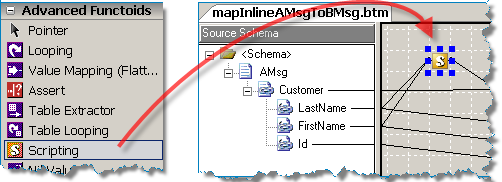

From Toolbox to Design Window   

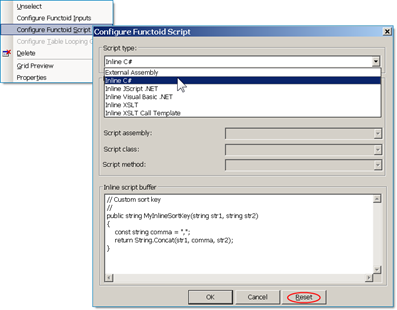
Right click on the scripting functoid and add your C# code:
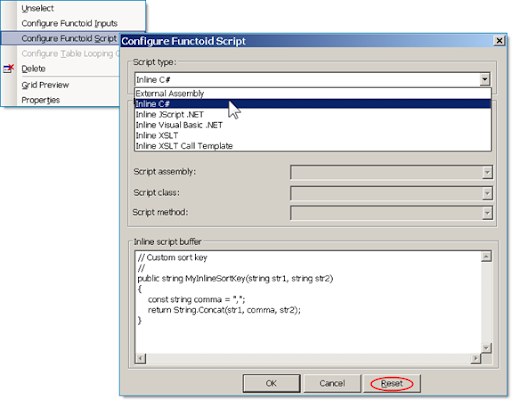

From Funtoid Menu to Script Dialog 

Tip: In a previously saved map, if you switch between Script Types be sure to click the Reset button first, otherwise old settings (including C# code!) will stick around and the Script Type property won't necessarily change even though there is no warning.

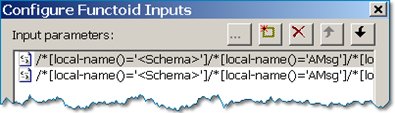
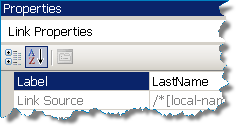
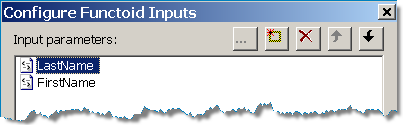
Tip: You can display friendly names for your input parameters if you set the Label property for each link.  View the link properties by clicking each link (line) in the map.

Unlabeled Links
Configure Functoid Inputs 1 

Label Property
Link Properties

Labeled Links
Configure Functoid Inputs 2

Limitations of Inline Scripting

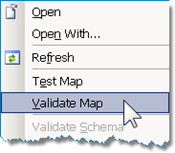
Validate Map Once the map is completed we can validate it and view the generated XSL file. I encourage you to create a simple map, validate it, then look at the resulting XSL file... even if you know only a smattering of XSLT you can gain lots of insight into how the actual mapping is working (or not!).

If we look at the XSL file from the map above we discover that the BTS Mapper puts all of our inline C# code into a CDATA section. There is a screenshot below. Then within an XSLT statement our C# method is called. This is actually the key to the whole series of articles! In this case the BTS Mapper designed the XSLT extended syntax for us, but as you will find out in part 2 we can do it for ourselves!

So, why would we ever want to do manually what the BTS Mapper can do for us automatically? Well, if you reflect on the above paragraph you'll notice that our C# method is called from an XSLT statement. To highlight this point, below are the snippets from the XSL of our map:

This section is how the XSL inline C# is automatically defined within a CDATA section. Noticed the prefix "userCSharp" as in the future this will come in handy.

<
msxsl:script language="C#" implements-prefix="userCSharp"><![CDATA[
    public string MyInlineSortKey(string str1, string str2)
    {
        const string comma = ",";
        return String.Concat(str1, comma, str2);
    }
]]></msxsl:script>


Here is the actual XSLT that is generated. A variable named "v1" is created and our method is called by passing the XPATH values of LastName and FirstName. The actual use of the C# method is very straight forward.

<xsl:variable name="var:v1"
              select="userCSharp:MyInlineSortKey(string(Customer/LastName/text()),
                      string(Customer/FirstName/text()))
" />
<
SortKey>
    <
xsl:value-of select="$var:v1" />
</
SortKey>

To come back to the question, why would we want to implement a call to a helper class manually? It's because there are limitations to what you can do with inline C#. Specifically, inline C# that looks like the following will not compile even if the MyMapUtility reference was added to the map project.

MyMapUtility.Strings stringUtil;
return
stringUtil.MySortKey(str1, str2);

From MSDN (references at end):

BizTalk saves inline scripts in the Extensible Stylesheet Language Transformations (XSLT) stylesheet defining the map. Because of this, inline scripts may use the same namespaces as any other XSLT stylesheet script.

What this means is that even if you add the helper class reference to your map project, you will not be able to call your methods with inline scripting and the map project will not compile. Part 2 will cover how this can be accomplished using XSLT call templates. Here are the namespaces that are supported for inline scripting, so remember with inline C# scripting you can use these namespaces but no other:

Supported namespaces for inline scripting
Namespace Description
System The System class
System.Collection The collection classes
System.Text The text classes
System.Text.RegularExpressions The regular expression classes
System.Xml The core XML classes
System.Xml.Xsl The XSLT classes
System.Xml.Xpath The XPath classes
Microsoft.VisualBasic The Visual Basic script classes.

External Assembly Script Types

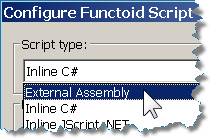
Script Type External AssemblyAs we've examined, inline C# scripting only supports a certain set of namespaces. And in part 2 we'll look at custom XSLT templates that let use use any external assembly. However, there is functionality out of the box that the BTS mapper provides for using External Assemblies.

The main caveat is that the default constructor (parameterless) on the external class will be used. In some cases you may find yourself wanting to create a wrapper class created especially for mapping that handles a custom initialization of the actual helper class.

Knowing how the External Assembly and method call is incorporated into the map will help us in part 2 when we describe manually using an external assembly.

Here is a example helper class that is designed to return two strings separated by a comma. After creating the helper class add its reference to the Map project.

Typical helper class. This method will take two inputs and return a value:

namespace RDA.BizTalk.Learning.MapUtility
{
    ///
<summary>
    ///
String Utilities
    ///
</summary>
    [Serializable]
    public class
Strings
    {
       
// A custom sort key
       
//
        public string MySortKey(string str1, string str2)
        {
            const string comma = ",";
            return String.Concat(str1, comma, str2);
        }
    }
}


Assign the External Assembly to your scriptoid and pick your class method:
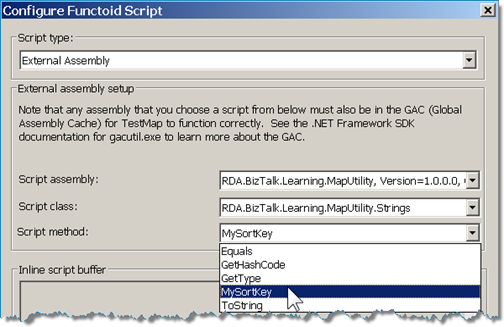
image
TIP:
If you right click and "Test" a map that uses an external assembly, the assembly must already be added to the GAC, otherwise the test will fail.

Validate MapNow let's examine what the mapper does with the external assembly to call it. We can do this by right clicking the map and picking "Validate". The output of the validation process is the XSL file and an Extension Object XML file.

The Extension Object XML file was created automatically based on all the external assemblies used in the map (in this case, just one). It contains the assembly reference that the XSL will use. It looks like the following:

Extension Object XML:

<ExtensionObjects>
  <
ExtensionObject
      Namespace=
"http://schemas.microsoft.com/BizTalk/2003/ScriptNS0"
      AssemblyName="
RDA.BizTalk.Learning.MapUtility,
          Version=1.0.0.0,
          Culture=neutral,
          PublicKeyToken=f7eb52812c0b3fa1
"
      ClassName="RDA.BizTalk.Learning.MapUtility.Strings"
/>
</
ExtensionObjects>

Now, let's examine the XSL file. It turns out that the use of the external assembly will look almost exactly like how the inline C# code was called. The only difference is that in this case in the header of the XSL file a namespace alias is created for "ScriptNS0". I encourage you to validate your own simple map that uses an external assembly.

External Assembly XSLT:

<
xsl:variable name="var:v1"
             
select="
ScriptNS0:MySortKey(string(Customer/LastName/text()),
                      string(Customer/FirstName/text()))
"
/>
<
SortKey
>
    <
xsl:value-of select="$var:v1"
/>
</
SortKey
>


The inline C# code XST from the previous section for comparison:

<
xsl:variable name="var:v1"
              select="
userCSharp:MyInlineSortKey(string(Customer/LastName/text()),
                      string(Customer/FirstName/text()))
"
/>
<
SortKey
>
    <
xsl:value-of select="$var:v1"
/>
</
SortKey
>

TIP: The "userCSharp" prefix is used for all of your inline methods. If you have your own inline XSLT transformations you can call previously defined inline C# methods yourself!

TIP: Though not necessarily a best practice it is possible to create a "floating" scriptoid (not connected to anything!) that just contains a few methods (yes, more than one) that you will call elsewhere in the map. You can call them from custom XSLT, and you can also call them from inline C#! In this manner you could have a GET and SET method to cache calculated values that are valid during the execution of the map.

TIP: A scriptoid must have a least one output to the target schema in order to be executed by the XSLT map. Otherwise, the map will still compile however the scriptoid will not execute.

External Links from MSDN


External Links about BizTalk Mapper Performance