Showing posts with label BizTalk. Show all posts

How to get to the packaged EDI schemas

I needed to validate a clients test message against the standard EDI schema for an X12 810 message but did an extensive search and was not able to find the schema for the message.

I found the EDI base DLL that contains the schemas (Microsft.BizTalk.EDI.BaseArtifacts.dll) but this didn't give me the ability to validate against the schema.

Turns out that all of the EDI XSD schemas are packaged in an exe located in: \Program Files\Microsoft BizTalk Server 2006\XSD_Schema\EDI. Just unpack the file named MicrosoftEdiXSDTemplates.exe and you will have extractions for all of the EDI schemas for EANCOM, EDIFACT, HIPPA and X12.

Be careful because this is a huge number of files. I opened the exe in win rar and just extracted the X12 files.

From there you can just add the schema to your project and validate your message

Mapping Unrelated Records

Introduction

I was recently asked to create a map to combine parent records with children records. The challenge was that the children records in the source document where not grouped with their parent record.

Mapping Unrelated Records

The message was similar to the following Xml where StatusItem is related by its ordinal position to DetailStatus/DetailItem. Look carefully at the message; the StatusItem parent node is SummaryStatus, which is at the same level in the Xml as DetailStatus. There is only one SummaryStatus node, and there are multiple DetailStatus nodes – all at the same level in the Xml.

<root>
  <
SummaryStatus>
    <
SummaryCode>102</SummaryCode>

    <
StatusItem>
      <
statusCode>item_0</statusCode>
    </
StatusItem>

    <
StatusItem>
      <
statusCode>item_1</statusCode>
    </
StatusItem>

    <
StatusItem>
      <
statusCode>item_2</statusCode>
    </
StatusItem>
  </
SummaryStatus>

  <
DetailStatus>
    <
DetailItem>
      <
statusCode>detail_0</statusCode>
    </
DetailItem>
  </
DetailStatus>

  <
DetailStatus/>
    <
DetailItem>
      <
statusCode>detail_1</statusCode>
    </
DetailItem>
  </
DetailStatus>

  <
DetailStatus/>
<
root>

In reality a message similar to the above is being provided by an outside source and we cannot modify it. By convention we are given the assumption that there is a DetailStatus record for each StatusItem, however there is not always a DetailItem. Our job is to map the output and combine the StatusItem code with its each DetailItem code.

The output goal is similar to the following Xml:

<root>
  <
SummaryCode>102</SummaryCode>

  <
StatusItem>
    <
StatusCode>item_0</StatusCode>
    <
DetailItem>
      <
StatusCode>detail_0</StatusCode>
    </
DetailItem>
  </
StatusItem>

  <
StatusItem>
    <
StatusCode>item_1</StatusCode>
    <
DetailItem>
      <
StatusCode>detail_1</StatusCode>
    </
DetailItem>
  </
StatusItem>

  <
StatusItem>
    <
StatusCode>item_2</StatusCode
  </StatusItem>
</
root>

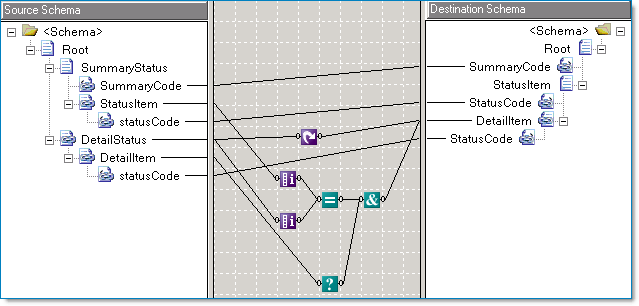
The BizTalk map below works by using the Iteration Functoid comparing the position of the current SummaryStatus parent record to the position of the DetailStatus record. Additionally the Logical Existence Functoid is used so that if a DetailItem does not appear in the source message, then it won’t appear in the Target message.

MapParentToChild

External Links from MSDN

Previous Articles

How to Recover the XML for an Acivity

Recently I created an activity, then saved off the XML from Excel to a folder (let’s call it v1) to deploy using the command like tool BM.exe.

I needed to make significant changes to the activity, so significant in fact, that I needed to re-create the activity entirely, so I made a new activity (call it v2) and made the mistake of overwriting the v1 XML file. When I wanted to remove the previous (v1) activity, I realized that I had no way to remove it because BM.exe requires the use of the saved off XML file.

Being fairly new to BAM, I wondered, how do I remove the v1 activity?

Well, there is a way to recover the XML from the v1 activity.

From the command line, execute:

bm.exe get-defxml -FileName:BAMDefinition.xml

That command recovers the configuration from the BAM DB which can then be leveraged to delete the v1 version of the activity.

Note: You must edit the XML to maintain the activities you want, if you exec the remove without editing the XML first you remove ALL your activities in the DB.

Then you can then execute:

bm.exe remove-all -DefinitionFile: BAMDefinition.xml

You should never delete anything surrounding BAM by hand, this will cause major problem if you do.

BAM: The Case of the Missing Pivot Table Data

I had a recent problem getting a pivot table to display its data on the BAM portal. I went thru a series of steps to get it working, so in case you have a similar problem here are some things to check to get the data displaying.

To frame things: I had a BAM activity with a series of data points to be tracked. I needed to extract a very simple count/sum cube from the data.

I set up the activity and went thru the view setup in Excel. I had a dimension which tracks a calling system and a then I wanted to get a count/sum of another field which was setup as an integer.

I couldn’t get it working; the view in the portal wouldn’t show any data at all. The calling system wouldn’t appear and neither would the count. I tried to set up the view as both a count (like a rowcount) and a sum and neither one showed the data.

I was pretty sure that I set the activity up correctly so I began to look at different things that could be wrong.

One of the first was to check if the SQL job "TrackedMessages_Copy_BizTalkMsgBoxDb" was running, it was.

Next, I used the SQL Management Studio to connect to Analysis Services on the server that BAM was configured on. I located the cube I was interested in, right clicked on it and select "Process...", data should have appeared. It didn’t. Something else was wrong.
I checked the associated SSIS package which is called BAM_AN_ which is responsible for populating the cube. I ran the package and was finally able to see the data in the BAM Portal.

Documentation for this can be seen here: http://msdn.microsoft.com/en-us/library/aa560072.aspx

So, to get things working right, I scheduled the SSIS package to the correct time interval and things were on track.

Activity Missing from your BAM Portal? This May be Why...

Recently I worked on a BAM implementation and found myself stumped as to why, after creating a new activity, it was not visible in the portal.

I thought it might have been a mistake in my configuration, deployment, or a rights issue. After a series of experiments I couldn't determine anything wrong with either my configuration or deployment so I turned to investigating if it was a rights issue or not.

It turned out to be. The following lines saved as a .bat file did the trick. Just replace the bracketed [ ] items with the names from your environment and it will work.

"C:\Program Files\Microsoft BizTalk Server 2006\Tracking\BM"
add-account -AccountName:[DOMAIN\user] -View:[ViewName]
-Server:[ServerName] -Database:BAMPrimaryImport

BTS Mapping With External Assemblies Part 3

Introduction

Part 1 - Inline scripting and external assemblies
Part 2 - XSLT Call Templates and custom extensions
Part 3 - Cascading Functoids

This is the third of three articles about BizTalk mapping with external assemblies. External assemblies or helper classes are used by BizTalk's mapping engine (XSLT) automatically, and they can also be used explicitly by the developer. Just as in an orchestration, a developer may find a requirement that the built in mapping tools ("functoids") do not address and in this case judicious use of a helper class can be very... helpful.

While these articles are not an introduction to mapping if you have a little experience with the BizTalk mapper and a little experience with XSLT you should be able to follow along.

Part 1, introduces inline C# scripting, its limitations, and also introduces the scenario of using an external assembly (helper class) automatically. Part 2, demonstrates using a map's custom extension property, which allows us to explicitly access external assemblies. Part 3, this article, will build on this discussion and highlight potential caveats about using cascading functoids; when the output of one functoid  is the input to another functoid(s).

Validating Maps that use Cascading Functoids

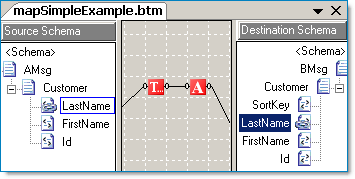
Whether a transformation is simple or complex, I often find validating a BizTalk map and viewing the XSLT output is beneficial. Below is an example of a simple map containing a cascading functoid; a function that calls another function. If we review the resulting XSL file the output is as expected. Yet, the output from maps containing cascading functoids that output to multiple targets (be it other functoids or other nodes) does not generate as I would expect.
image

The XSLT output from this map is as expected. The variable v1 contains the right trimmed string and serves as input to the UpperCase functoid, the output of which is assigned to v2. The value of v2 is then contained in the LastName node.

<xsl:template match="/s0:AMsg">
    <
xsl:variable name="var:v1"
         select="userCSharp:StringTrimRight(string(Customer/LastName/text()))"
/>
    <
xsl:variable name="var:v2"

        
select="userCSharp:StringUpperCase(string($var:v1))"
/>
    <
ns0:BMsg
>
        <
Customer
>
            <
LastName
>
                <
xsl:value-of select="$var:v2"
/>
            </
LastName
>
        </
Customer
>
    </
ns0:BMsg
>
</
xsl:template
>

Note: The built in functoids imbed inline C# code. We can use the "userCSharp:" XSL namespace ourselves when constructing XSLT functoids. We will see an example below.

Functoids with Multiple Outputs

The XSLT story changes when we examine output from the BizTalk mapper when using a functoid that is connect to more than one node (or cascading functoid). It turns out that in the example below, you will see that the entire functoid chain is executed twice. Once for the SortKey node, and once for the LastName node.

image 

Typically a functoid with multiple outputs will be executed once for each output. In this example, the entire functoid chain is executed once for each connection. Imagine using a helper class to get a database value, if one is not careful the same database helper method might be executed more than one time! The XSLT code below is what the BizTalk mapper generated for the map above.

<xsl:template match="/s0:AMsg">
    <!--
SortKey functoid chain
-->
    <
xsl:variable name="var:v1"
         select="userCSharp:StringTrimRight(string(Customer/LastName/text()))"
/>
    <
xsl:variable name="var:v2"

        
select="userCSharp:StringUpperCase(string($var:v1))"
/> 

   
<!--
LastName functoid chain -->
    <
xsl:variable name="var:v3"

        
select="string(Customer/LastName/text())"
/>
    <
xsl:variable name="var:v4"

         select="userCSharp:StringTrimRight($var:v3)" />
    <
xsl:variable name="var:v5"

        
select="userCSharp:StringUpperCase(string($var:v4))"
/>
    <
ns0:BMsg
>
        <
Customer
>
            <
SortKey
>
                <
xsl:value-of select="$var:v2"
/>
            </
SortKey
>
            <
LastName
>
                <
xsl:value-of select="$var:v5"
/>
            </
LastName
>
        </
Customer
>
    </
ns0:BMsg
>
</
xsl:template>

BizTalk Transformations with Value Caching

Let's expand on the example above. In the map below we have two functoid chains, each go to their respective output element and also to a string concatenation function, which is in turn connected to the SortKey field. Because we want our imagined map to be as efficient as possible we won't be able to completely use BizTalk's drag and drop mapping. We will need to eliminate the multiple connections that go to both the concatenation functoid and to the target fields. One way to do this is by implementing value caching combined with an XSLT call template to eliminate the multiple executions of the same methods. After describing the approach, there will be a short review of the benefits and caveats.
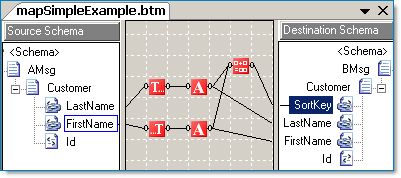
image

Value Caching with XSLT Call Templates and Inline C#

By looking at the first cut of our hypothetical map above, we can see that the LastName, FirstName, and SortKey target fields are all interconnected. Thus we are going to eliminate all the functoid chains and replace them with a single XSLT call template. In addition we'll add our own standalone C# code.

By adding an inline C# scripting functoid (#1) we can add methods to be called by the XSLT (#2) in the map.

image 

Even though functoid #1 is "floating" the C# code is still included in the map. This is a simple example of some accessor and related functions. They mainly will serve to cache the First and Last Name values so that we don't have to process them twice (Trim + Uppercase). The actual process of processing the string is for example only, the process could equally have been a database call to a helper function via an External Assembly object.

// SortKey: Return LastName + comma + FirstName
//
public
string GetSortKey()
{
    return System.String.Format("{0},{1}", GetLastName(), GetFirstName());
}

// LastName: Trim + Uppercase
//
public string _lastName = null;
public void SetLastName(string LastName)
{
    _lastName = LastName.Trim();
    _lastName = LastName.ToUpper();
}

// LastName: Return value
//
public string GetLastName()
{
    return _lastName;
}

// FirstName: Trim + Uppercase
//
public string _firstName = null;
public void SetFirstName(string FirstName)
{
    _firstName = FirstName.Trim();
    _firstName = FirstName.ToUpper();
}

// FirstName: Return value
//
public string GetFirstName()
{
    return _firstName;
}


Functoid #2 is an XSLT template, and it will call the C# methods and emit the SortKey, LastName, and FirstName fields. Here is what the XSLT call template looks like, it is quite similar to what we've already seen in the prior articles.

<xsl:template name="CustomerAndSortKeyTemplate">
    <!--
Customer & SortKey Input
-->
    <
xsl:param name="LastName"
/>
    <
xsl:param name="FirstName"
/>

    <!--
Cache and process the last/first name values:
         Call C# using the "userCSharp" namespace alias
         that the BizTalk mapper itself generated.
         Note: These calls return "void" thus, no output!
-->
    <
xsl:value-of select="userCSharp:SetLastName($LastName)"
/>
    <
xsl:value-of select="userCSharp:SetFirstName($FirstName)"
/>
   
    <!--
Emit the SortKey, LastName and FirstName fields
-->
    <!--
SortKey
-->
    <
xsl:element name="SortKey"
>
        <
xsl:value-of select="userCSharp:GetSortKey()"
/>
    </
xsl:element
>

    <!--
LastName (another way to emit a field)
-->
    <
LastName
>
        <
xsl:value-of select="userCSharp:GetLastName()"
/>
    </
LastName
>

    <!--
FirstName
-->
    <
FirstName
>
        <
xsl:value-of select="userCSharp:GetFirstName()"
/>
    </
FirstName
>
</
xsl:template>

Summary

Using XSLT and C# caching can be an efficient approach to designing a map that would otherwise unnecessarily consume too much processing bandwidth if the map were solely generated by the default BizTalk Mapper design output.

Some considerations to think about:

  • Using XSLT with the BizTalk mapper might require that you or your client have a comfort level about designing the mapping outside of the normal Drag and Drop approach. However, the efficiency of the custom XSLT, and to some degree the straight-forwardness of it may outweigh the amount of design time needed for a complicated Drag and Drop map.
  • The XSLT approach is more sensitive to schema changes. A simple map with out XSLT will fail validation (if not outright fail to compile) if a schema changes. However, custom XSLT is ultimately just syntax based on a matching mechanism. There is not compile time validation that the elements being emitted conform to the current target schema.

External Links from MSDN


External Links about BizTalk Mapper Performance

Article Links

Microsoft’s Intentions for “Dublin”

Microsoft .NET Framework 4.0 release will be adding significant functionality to the development platform. Among these is a large enhancement codenamed "Dublin" that will focus on improving scalability and manageability of Windows based applications and provide a standard host for applications by extending IIS.

“Dublin”, in a nutshell will:
  • Provide standard host for WF and WCF applications
  • Provide pre-built developer services
  • Support message-based correlation and content-based message routing
  • Contain a message forwarding service
  • Offer a compensation service for long-running transactions
  • Enable scale-out of stateful workflow applications
  • Persisting and rehydrating state for high scalability
  • Enhanced management and monitoring functions
  • Tracking store for workflow events
  • Supports “Oslo” modeling platform

You may read those bullet points and say “hey, this sounds like BizTalk”. Well, yes and no. The easiest way to view this is that some BizTalk functionality will be available within the .NET Framework.

“Dublin” will be available for download when released and will eventually be included in future releases of Windows Server. “Dublin” will be fully supported thru current support contracts.

“Dublin” will be the first Microsoft server product to deliver support for the “Oslo” modeling platform. “Dublin” does not require “Oslo” in order to operate but administrators will be able to deploy applications from the “Oslo” repository directly to the “Dublin” application server. “Dublin” provides model-driven “Oslo” applications with a powerful runtime environment, out of the box.

The intention is for “Dublin” based applications to interoperate with BizTalk based services. The integration server and application server workloads are distinct but complementary so they can be deployed separately as needed. The intention is for “Dublin” to be an application platform, BizTalk an integration platform. When they need to work together, they will be able to. Otherwise, requirements will drive which platform to use.

The Easiest Way to Try and Learn BizTalk: Virtual Labs

Microsoft has a great way to experiment with BizTalk Server. By using a virtual online environment, you can login to a session on remotely located server and use BizTalk without any of the complexities of setting up an environment yourself.

In terms of getting up to speed, there is no faster way to do it. Labs are guided, well structured and guided. Each lab builds on the last to give a user top to bottom exposure of BizTalk Server. All labs are in English and last about 90 minutes. If your session goes longer than 90 minutes, you can certainly extend this time.

You can give the BizTalk 2006 Virtual Labs a try at this address:
http://www.microsoft.com/biztalk/en/us/virtual-labs.aspx

Here is a list of the current labs available, 26 in total!
  • MSDN Virtual Lab Express: What's New in BizTalk Server 2006
  • MSDN Virtual Lab: Microsoft BizTalk Server 2006 Working with Schemas
  • MSDN Virtual Lab: Microsoft BizTalk Server 2006 Working with Maps
  • MSDN Virtual Lab: Working with Pipelines
  • MSDN Virtual Lab: Processing Flat Files
  • MSDN Virtual Lab: New Features for Processing Flat Files and Batch Messages using BizTalk Server 2006
  • MSDN Virtual Lab: Integration with POP3 and SharePoint and Routing Failed Messages
  • MSDN Virtual Lab: Creating an Orchestration
  • MSDN Virtual Lab: Implementing Transactions
  • MSDN Virtual Lab: Integrating Business Rules in Microsoft BizTalk Server 2006
  • MSDN Virtual Lab: Enabling Business Activity Monitoring
  • MSDN Virtual Lab: New Features for Deploying and Managing a BizTalk Application in Microsoft BizTalk Server 2006
  • MSDN Virtual Lab: WCF Introduction - Building a WCF Service
  • MSDN Virtual Lab: Using the WCF Adapters in BizTalk Server 2006 R2
  • MSDN Virtual Lab: Using the BizTalk Server 2006 R2 WF and WCF BAM Interceptors
    MSDN Virtual Lab: Building a Windows Communication Foundation (WCF) Adapter using the WCF LOB Adapter SDK
  • MSDN Virtual Lab: Processing EDI messages with BizTalk Server 2006 R2
  • MSDN Virtual Lab: Sending EDI Messages with BizTalk Server 2006 R2
  • MSDN Virtual Lab: Building an RFID application with BizTalk Server 2006 R2
  • MSDN Virtual Lab: Integrating Legacy Data with BizTalk Applications using BizTalk Adapters for Host Systems
  • MSDN Virtual Lab: Integrating Legacy Data with .NET Framework applications using Host Integration Server 2006
  • MSDN Virtual Lab: Integrating Legacy Applications with BizTalk Applications using BizTalk Adapter for Host Systems
  • MSDN Virtual Lab: Integrating Legacy Applications with .NET Framework applications using Host Integration Server 2006

Creating a BizTalk 2006 R2 VPC Template for Use in MS System Center Virtual Machine Manager


I was tasked with the objective of creating a way for the EAI group to "mass-produce" BTS2006 R2 servers on the corporate Virtual Server Self-Serve portal for development purposes. Note that before embarking on this task, make sure that you or your company has the appropriate licenses (MSDN or other) to set this up.

In analyzing the requirements for this, I found out that I would need to create a VPC with all the software on it. This VPC would then be processed and imported into the self-serve portal as a "template" for all machines to be made from. However, I found out some interesting information about the process the VPC is run through as it's being made into a "template".

The VPC is first run through an application named SysPrep. This software "anonymizes" the OS. It removes the Windows activation code and also removes all the Security Identifiers associated with all files and accounts. This means that any "non-system" accounts created before SysPrep is run will not match the accounts after SysPrep is run. This brought up the major issue I ran into while trying to complete this objective. While configuring both BizTalk and Windows SharePoint Services (WSS), you need to provide accounts, which will be the owners of the associated processes. The issue would be that any account(s) I create and configure before SysPrep is run would not match the account(s) on each instantiation of the template, since the security IDs associated with the accounts wouldn't match.

During discussions about this issue, someone theorized about possibly installing all the software, but not configuring the ones that need specific accounts (BTS 2006 and WSS 2.0/3.0). That's when I tried going through the Microsoft Installation instructions for BTS 2006 R2 (
http://www.microsoft.com/downloads/details.aspx?FamilyID=df2e8a88-fb23-49a4-9ac7-d17f72517d12&displaylang=en). In order to create a "template" for the Self-Service Portal, I created a VPC, with all the software products installed. I started with Windows Server 2003 (Enterprise). I changed the order in one aspect, in that they instruct you to install Windows 2003, then run Windows Update, and then install IIS. What I did was to install Windows Server 2003, then install IIS and the POP3 service, and then run Windows Update, so that I could get any update files specifically marked for IIS or the mail server.

After I did that, then I installed the Office Components. The instructions specified Excel and InfoPath, but I also included Word. However, one note on these components. During installation, I did not use a Product Key for Office. This was so that whoever needs to use the server can use their own Office product key.

I then installed Visual Studio 2005, and then service pack 1 for VS 2005. I did add a feature not listed in the instructions. The instructions indicate that you should unselect all features except Visual C# and .Net Framework SDK. I did keep the Visual Web Developer component, in case any web services needed to be included in any project.

At this point, the instructions indicate that SQL Server 2005 should be installed. Now, one option in the installation for SQL allows for the use of a separate account, under which SQL server will run. Another option allows for SQL Server to run under a "defined system account". I chose this option because, when the VPC/VHD is imported and converted to a template for use in the Self-Service portal, the SIDs are all stripped out of accounts, so an account created now would not match an account when the template is "instantiated" into a particular instance.

At this point, I added the additional software packages requested to be on the server, including NUnit and BizUnit.

The next step includes installing first, Windows SharePoint Services (WSS) 3.0, and then WSS 2.0. Both versions were installed because the BAM portal in BTS 2006 is only supported on WSS 2.0, but most project work moving forward will likely be done on WSS 3.0. Thus, if you want to have the BAM portal on the same box that you have a WSS 3.0 site (or MOSS 2007 site), you need to have both versions of SharePoint installed. Note that after the installation is completed, the instructions indicate that configuration is next. Because user accounts are involved in the create of Application Pools when using WSS on IIS, this step was "postponed" until a particular instance was created.


The last software package installed was BizTalk Server 2006 R2 itself. I went through all the steps and did all the installation, but on the last screen, where the checkbox indicating that the configuration wizard should run after setup is completed, I unchecked this so that it could be done on a per instance basis.

After everything was done, I defragmented the hard drive, ran the pre-compaction utility, and then compacted the drive. This allowed for a smaller VHD for import and cleaned up a lot of space in the VHD after all the updates had been made.

Mapping With External Assemblies Part 2

Introduction

Part 1 - Inline scripting and external assemblies
Part 2 - XSLT Call Templates and custom extensions
Part 3 - Cascading Functoids

This is the second of three articles about BizTalk mapping with external assemblies. External assemblies or helper classes are used by BizTalk's mapping engine (XSLT) automatically, and they can also be used explicitly by the developer. Just as in an orchestration, a developer may find a requirement that the built in mapping tools ("functoids") do not address and in this case judicious use of a helper class can be very... helpful.

While these articles are not an introduction to mapping if you have a little experience with the BizTalk mapper and a little experience with XSLT you should be able to follow along.

Part 1, introduces inline C# scripting, its limitations, and also introduces the scenario of using an external assembly (helper class) automatically. Part 2, this article, demonstrates using a map's custom extension property, which allows us to explicitly access external assemblies. Part 3 will build on this discussion and highlight potential caveats about using cascading functoids; when the output of one functoid  is the input to another functoid(s).

External Assembly Script Type Review

In part 1 we examined inline scripting with C# and pointed out that only the built-in XSLT engine namespaces can be used. We also showed that when using an External Assembly Script Type an Extension Object XML file is automatically created, which contains the external assembly references that the XSL will use.

The contents of the Extension Object Xml file that is made during the build looks like this:

<ExtensionObjects>
  <
ExtensionObject
      Namespace=
"http://schemas.microsoft.com/BizTalk/2003/ScriptNS0"
      AssemblyName="
RDA.BizTalk.Learning.MapUtility,
          Version=1.0.0.0,
          Culture=neutral,
          PublicKeyToken=f7eb52812c0b3fa1
"
      ClassName="RDA.BizTalk.Learning.MapUtility.Strings"
/>
</
ExtensionObjects>


Custom Extension Xml Property

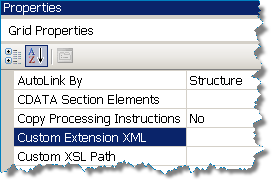
imageIf we want to explicitly include external assemblies in our map we can assign the "Custom Extension Xml" Grid Property. Click on the background (grid) of your map in design mode to find the properties. The property represents an Xml file that is formatted as shown above, and it will contain only those assemblies that you wish to manually reference. As we will see, other assemblies referenced by External Assembly Script Types will be automatically appended to this file during the build.
I normally name my file "External Assemblies.xml". The following is an example. I usually leave the Namespace as the Namespace of the class.  That way if I have one assembly (as I do below) I will have 2 unique namespaces. Remember, your external assemblies are probably already in the GAC.

<ExtensionObjects>
    <
ExtensionObject
        Namespace=
"http://RDA.Corporate.EAI.Common.Helper.Methods.Timestamps"
        AssemblyName="
RDA.Corporate.EAI.Common.Helper.Methods,
                     
Version=1.0.0.0,
                      Culture=neutral,
                      PublicKeyToken=9f177c4f1a417459
"
        ClassName="RDA.Corporate.EAI.Common.Helper.Methods.Timestamps"
/>
    <
ExtensionObject
        Namespace="http://RDA.Corporate.EAI.Common.Helper.Methods.DBUtility"
        AssemblyName="
RDA.Corporate.EAI.Common.Helper.Methods,
                      Version=1.0.0.0,
                      Culture=neutral,
                      PublicKeyToken=9f177c4f1a417459
"
        ClassName="RDA.Corporate.EAI.Common.Helper.Methods.DBUtility"/>

</ExtensionObjects>

Using the Referenced External Assemblies

We already know that unfortunately we cannot use these classes with inline C# scripting. However, we also know that ultimately the mapper is simply creating XSLT and calling the C# methods, and we can do the same.

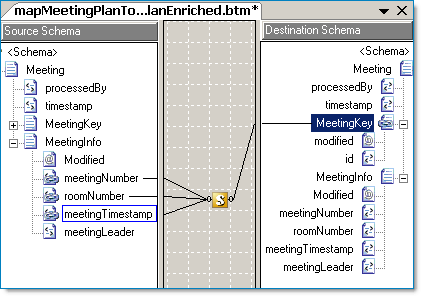
Let's pretend, for example, that based on a meeting number, room number and timestamp that I need to retrieve a meeting record id. My DBUtility class contains the methods I need to use.

  1. Add a reference for the RDA.Corporate.EAI.Common.Helper.Methods assembly.
  2. Create and add External Assemblies.xml file (named to your liking) to your map project.
  3. Assign the Custom Extension XML Grid Property.
  4. Add a scriptoid to your map.
  5. Set it's script type to XSLT Call Template.
  6. Assign input parameters, and assign the output to the target schema node as required.

Here is my map, I'm going to enrich the original message by filling in the MeetingKey record. I'll be using an XSLT call template. Remember it is the XSLT that is driving the mapping within the scriptoid. See the next paragraph.


image 


Here is my XSLT call template that I've assigned to my scriptoid shown above.

<xsl:template name="MeetingKeyCallTemplate">

    <!--
Meeting Key Input
-->
    <
xsl:param name="meetingNumber"
/>
    <
xsl:param name="roomNumber"
/>
    <
xsl:param name="meetingTimestamp"
/>

    <!--
Get the meeting key and assign it to variable
-->
    <
xsl:variable name="meetingKey"  
       
<!-- I'll just use the prefix "script" which is easy to type --> 
        xmlns:script="http://RDA.Corporate.EAI.Common.Helper.Methods.DBUtility"
        <!-- Call my external method GetMeetingKey() -->                  
        select="script:GetMeetingKey($meetingNumber,
                       $meetingTimestampDateTime,
                       $roomNumber)
"
/> 

    <!--
Emit the MeetingKey and modified attribute values
--> 
    <MeetingKey>
        <
xsl:attribute name="modified">Yes</xsl:attribute
>

        <
xsl:element name="id"
>
            <
xsl:value-of select="$meetingKey"
/>
        </
xsl:element
>
    </
MeetingKey


<!--
Emit the MeetingNumber, RoomNumber and MeetingLeader fields --> 
    <MeetingInfo>
        <
xsl:element name="MeetingNumber"
>
            <
xsl:value-of select="$meetingNumber"
/>
        </
xsl:element
>

        <
xsl:element name="RoomNumber"
>
            <
xsl:value-of select="$roomNumber"
/>
        </
xsl:element
>

       <!-- Note: The MeetingLeader value comes directly from the original message  -->
      
<xsl:element name="MeetingLeader">
            <
xsl:value-of select="MeetingInfo/MeetingLeader/text()"
/>
        </
xsl:element
>
    </
MeetingInfo
>

</
xsl:template>

TIP: In part 3 we'll see similar code again and we will combine into one example the use of external assemblies, inline C# scripting and value caching in a discussion about cascading functoids.

Custom Extension XML and External Assembly Script Types

The BizTalk mapper will accommodate maps using both custom Extension XML file as described here and also uses External Assembly Script Types. In this case the Extension Object XML file that is used will combine your custom references along with the automatically added External Assembly Script Type references. Validate your map and check it out!


External Links from MSDN


External Links about BizTalk Mapper Performance