BizTalk Server 2006 Documentation Update

Microsoft released an update to the BizTalk Server 2006 documentation on 10/10/2006. It can be found here BizTalk 2006 Documentation Update (41.6 MB)

Overview
In this Help Update, you'll find the following content:


  • Complete documentation for all BizTalk Server Line of Business Adapters, including new tutorials, one for each adapter. See the section "Using Adapters."


  • Troubleshooting guidance for each of the native BizTalk adapters. See the section "Troubleshooting Adapters."


  • Troubleshooting Instructions for how to capture a memory dump. See the section "How to Capture a Memory Dump of a BizTalk Process."


  • Disaster recovery instructions for backing up and restoring your BizTalk Server and databases. See the section "Backing Up and Restoring BizTalk Server"


  • Updated Tutorials. See the section, "BizTalk Server 2006 Tutorials"


  • Information for improving fault tolerance. See the section "Planning and Architecture"


  • Updated Developer's Reference that now includes the BAM namespaces that were not included in the RTM documentation. See the section "Developer's Reference"


BizTalk 2006 R2 B2B/EDI WebLog

The Microsoft BizTalk Product Development team is launching the B2B/EDI WeBlog on the MSDN platform to communicate feature/functionality relating to EDI, AS2 and HIPAA in BizTalk Server 20006 R2. Key objective of the blog is to increase product awareness and also assist with partner readiness thereby leading to a successful launch of the EDI Technology in R2.

The blog can be found here http://blogs.msdn.com/BizTalkB2B/

Business Policy Management and the BizTalk Rules Engine

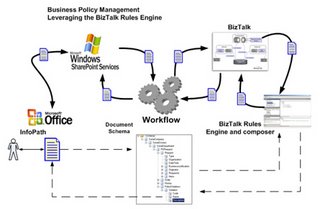
Earlier in the year we designed an architecture in which the BizTalk Rules engine was leveraged along with InfoPath, SharePoint and K2.Net to manage business policies in a human to human and human to system workflow solution. The full article can be found (here). We found this design to work extremely well in regards to providing an agile approach at managing business process policies in a generic way. Following is a brief fragement of this article.

RDA leverages the BizTalk Business Rules Engine to manage business policies in document workflow solutions. Document management workflows come in many shapes and sizes. Many of these workflows operate under rigid business policies, which often affect how documents flow through a process or influence decisions along the way.

Business policies are often fluid. They change with time. Any solution dependent on changing business policies must be agile by design. As such, the rules that govern the policy of a given document workflow needs to be easily maintained without affecting the solution deployed in a running production environment. The BizTalk Business Rules Engine provides just a mechanism.

The diagram below depicts a workflow system that leverages the rules engine to enforce and manage fluid business policies.


Browse all the RDA Spotlight on Business and Technology newsletters here:
http://www.rdacorp.com/SpotlightNewsletters.htm

Choosing BizTalk over WebSphere

The following is a good whitepaper providing a comparative analysis of Microsoft BizTalk and IBM WebSphere. Note while this whitepaper is a bit dated and BizTalk 2004 centric, its still very much applicable to BizTalk 2006.

http://download.microsoft.com/download/0/1/E/01E77F30-E571-478D-A8F8-F35FE66BD2BD/ChsBPASol.doc

Mapping complex conditions in BizTalk with XSLT

Recently I found myself in a situation where I needed to evaluate a set of complex conditions that I could not use the Business Rules Engine for. The BizTalk mapper was able to achieve the conditionality by chaining a series of about 21 functoids together but this became very unmanageable especially since I was combining false statements to see if both were false, then returning a true to an “And” functoid (&) which evaluated another branch as true and passed a result to the node in the destination schema, you get the idea.

An easier way is to plug in XSLT. There are disadvantages to doing this, the main one being its maintainability and transparency but when faced with the daunting set of functoids described above, it looked a decent option.

The XSLT function that I used was the <xsl:choose> statement, inside the statement was a set of conditions which, if true, would return a value/values to the destination schema. In the last part of the statement was the <xsl:otherwise> condition which could set values if the conditions presented were not valid and you had a default you wanted to present in that event.

<xsl:variable name="var:vAnnuity" select="count(/*[local-name()='InternalSupport' and namespace-uri()='http://internal_support']/*[local-name()='LoanPartItems' and namespace-uri()='' and Method='Annuity'])" />

<xsl:variable name="var:vLinear" select="count(/*[local-name()='InternalSupport' and namespace-uri()='http://internal_support']/*[local-name()='LoanPartItems' and namespace-uri()='' and Method='Linear'])" />

<xsl:variable name="var:vTotalCount" select="count(/*[local-name()='InternalSupport' and namespace-uri()='http://internal_support']/*[local-name()='PartItems' and namespace-uri()=''])" />

<xsl:variable name="var:vHasValidEndowment" select="count(/*[local-name()='InternalSupport' and namespace-uri()='http://internal_support']/*[local-name()='LoanPartItems' and namespace-uri()='' and isValid ='true'])" />

<xsl:variable name="var:vHasValidId" select="count(/*[local-name()='InternalSupport' and namespace-uri()='http://internal_support']/*[local-name()='Ready' and HasValidId ='true'])" />

<xsl:element name="LeningSoort">

    <xsl:choose>

        <xsl:when test="$var:vAnnuity = $var:vTotalCount">

            <xsl:value-of select="1" />

        </xsl:when>

        <xsl:when test="$var:vLinear = $var:vTotalCount">

            <xsl:value-of select="2" />

        </xsl:when>

        <xsl:when test="($var:vHasValidEndowment = $var:vTotalCount) and ($var:vHasValidId = $var:vTotalCount)">

            <xsl:value-of select="3" />

        </xsl:when>

        <xsl:otherwise>

            <xsl:value-of select="4" />

        </xsl:otherwise>

    </xsl:choose>

</xsl:element>


Of course each specific case requires different XSLT, but this should provide a framework of how to do this within a functoid.

To set up the XSLT:

• Create XSLT similar to the one above which meets your needs
• Drop a scripting functoid on your map
• Connect the output parameter to the node you want to create
• Note: do no include any input parameters, the XSLT is setup already to look them up
• Open the scripting functoid’s, click the (…) inside “Configure Functoid Script”
• Under “Script type” choose “Inline XSLT”
• Paste your XSLT snippet in the text box

XSLT performance when mapping large documents in BizTalk

Recently I had to map a document with many thousand rows. I could not split the document because before I could split it, the document’s nodes had to be sorted.

With such large files you generally test it using a small subset to avoid waiting for maps to complete, I built an XSLT which worked great, I thought.

When you use a select filter such as "not(KeyValue=preceding-sibling::row/ KeyValue)" you end up with a huge performance hit the larger the document gets. My map went from 2 seconds for 50 rows to 10 minutes for a few thousand.

How to improve performance when you have large XML files to map that you can’t split? Try using xsl:key instead, which builds an index of keys from which you can much more efficiently select.

Here is a sample XSLT that demonstrates how to use the xsl:key:


<?xml version="1.0" encoding="UTF-8" ?>

<xsl:stylesheet xmlns:xsl="http://www.w3.org/1999/XSL/Transform" version="1.0" xmlns:ns0="http://Conversion.schemas">

    <xsl:output method="xml" indent="no" />

    <xsl:key name="NumberKey" match="/*[local-name()='top' and namespace-uri()='http://biztalk/Conversion.schemas']/*[local-name()='row' and namespace-uri()='']"

        use="keyValue" />

    <xsl:template match="/">

        <ns0:Rows>

            <xsl:for-each select="/*[local-name()='top' and namespace-uri()='http://biztalk/Conversion.schemas']/*[local-name()='row' and namespace-uri()='' and generate-id(.) = generate-id(key('NumberKey', keyValue)[1])]">

                <xsl:variable name="current_Number" select="keyValue" />

                <Data>

                    <keyValue>

                        <xsl:value-of select="$current_Number" />

                    </keyValue>

                    <xsl:for-each select="//row[keyValue=$current_Number]">

                        <Part>

                            <PartID>

                                <xsl:value-of select="nr_data" />

                            </PartID>

                        </Part>

                    </xsl:for-each>

                </Data>

            </xsl:for-each>

        </ns0:Rows>

    </xsl:template>

</xsl:stylesheet>

You can evaluate dates using the Cumulative Maximum Functoid

Dates you say? Stop the press!

I had a situation where there was a node whose max occurs is unbounded and I needed to extract a single node from it to map to a destination node whose max occurs is one.

The problem was that I had to choose the node to map with the highest (newest) date:
<root>
<data>
<testdate>01-01-2000<testdate>
<testdata>a<testdata>
</data>
<data>
<testdate>01-01-2002<testdate>
<testdata>c<testdata>
</data>
<data>
<testdate>01-01-2001<testdate>
<testdata>b<testdata>
</data>
</root>

In the case above, I want the node with the highest <testval>, or 01-01-2002, therefore I want to map <testdata>c<testdata> to the destination node.

This can actually be done.

What I did was convert my date to ticks in a scripting functoid:

public string toTicks(string param1)
{
DateTime dt = DateTime.Parse(param1);
return dt.Ticks.ToString();
}

Afterwards I connected the scripting functoid to the cumulative max functoid.

Then I evaluate the output of the scripting functoid with the cumulative max functoid with an Equals functoid.

This should work for any set of repeating dates.

BizTalk's mapper allows drag and drop replace

I learned a little trick the other day about the mapper which I have never seen documented. It works for BizTalk 2004 and also 2006.

Have you ever had to change a functoid and gone thru the task of dragging the new functoid onto the grid and then reconnecting all of the lines, then having to check to make sure you got them all in order?

Well, what I realized quite by accident is that you can actually just drag the new functoid over the one you want to replace and all your links will maintain themselves. The old functoid will disappear and be replaced by the new one.

Of course there is a limitation when you have different maximum inputs, etc, but for the most part this works with everything else.

Blogging about .NET? Then this is a must have tool

I’ve found a tool recently that will make blogging about BizTalk easier. It’s been around for a while but if you are like me and have never heard of it before, CopySourceAsHtml is very useful.

If you have been in the situation of wanting to post a code or XSLT snippet onto your blog and found yourself writing HTML to make it look like it does in Visual Studio (or resort to screen shots) then fret no more, CopySourceAsHtml will take anything that you can open in VS (source code related) and convert it to HTML for you.

The tool is written by Colin Coller and can be downloaded on the CopySourceAsHtml homepage. In addition, Colin has a blog which updates progress on the tool. I read that a VS 2005 version is soon to be ready.

A couple of tips when using it:

  • After installing you should be able to open any C# source code page, highlight and right click a code snippet and see a new “Copy as HTML” item on the menu. But, if for example you want to copy XSLT, the item doesn’t show up. Use the edit menu instead.
  • When you copy something as HTML, under general, uncheck the “Number lines from:” box unless you really want them and also check the “Embed styles” box since blog tools/some browsers wont recognize the style sheet that gets created. Embeding the style makes it a simpler operation.

Easier way to add a DLL to the GAC

Often in BizTalk you’ll need to add assemblies to the Global Assembly Cache. In the past I had used a shortcut on my Quick Launch toolbar which opened the GAC, then I’d drop the assembly inside, but there is an easier way.

A registry key can be created which allows you to right click the DLL and “GAC it” in one click.

The text for the key is below; simply copy/paste it into notepad and save it as a registry file (.reg). Then double click the file to add it to the registry.

Windows Registry Editor Version 5.00

[HKEY_CLASSES_ROOT\dllfile\shell\gacutil\command]
@="c:\\windows\\Microsoft.NET\\Framework\\v1.1.4322\\gacutil.exe /i \"%1\""


You can also download the Gacutil right-click key as a zip file here.